Scenic Draft 0.19: Bring Your Own Shader Code
scenic-draft is a TypeScript library for rendering 3D scenes in the browser. You describe the shapes and lighting, and it generates a shader to draw them.
Version 0.19.0 lets you add your own GLSL functions for shapes, patterns, bumps and backgrounds. Let's look at how to use each one.
Patterns, new primitives and the other changes since 0.13.0 are covered in the companion post.
The images below were rendered with the library in a headless browser and saved as files.
The examples use the fluent API, imported from scenic-draft-react.
Four extension points
Scenes are plain data: sphere(1) returns { kind: 'sphere', radius: 1 }. A custom node also stores GLSL source and arguments. The compiler includes your function in the shader and calls it with those arguments as constants.
| The function you write | What the library still does | |
|---|---|---|
custom({ name, code, args, lipschitz }) | float name(vec3 p, …) → a distance | calls it wherever the tree walk has reached, and divides by lipschitz |
patterns.custom(color, options) | float name(vec3 p, …) → 0..1 | evaluates it in the shape's own frame, and mixes the material towards the pattern's colour |
bumps.custom(strength, options) | float name(vec3 p, …) → a height | scales the point, takes three samples around it, works out the slope and turns the normal |
customBackground({ name, code, args, sun }) | vec3 name(vec3 rayDir, …) → a radiance | calls it wherever a ray escapes, and adds the sun on top |
All custom functions share the shader's namespace. There is no registration or initialisation step: the source is a string in the scene data, which can still be serialised.
A primitive of your own
custom creates a node from your distance function. You can apply the usual transforms, materials and boolean operations to it.
Inigo Quilez's catalogue is a useful source of distance functions. They take a query point followed by shape parameters, which matches custom. Let's try a box frame:
const BOX_FRAME = `float sdBoxFrame(vec3 p, vec3 b, float e) {
  p = abs(p) - b;
  vec3 q = abs(p + e) - e;
  return min(min(
    length(max(vec3(p.x, q.y, q.z), 0.0)) + min(max(p.x, max(q.y, q.z)), 0.0),
    length(max(vec3(q.x, p.y, q.z), 0.0)) + min(max(q.x, max(p.y, q.z)), 0.0)),
    length(max(vec3(q.x, q.y, p.z), 0.0)) + min(max(q.x, max(q.y, p.z)), 0.0));
}`

// Usually worth a helper, so the scene reads like it does anywhere else.
const boxFrame = (size: Vec3, thickness: number): Shape =>
  custom({ name: 'sdBoxFrame', code: BOX_FRAME, args: [size, thickness] })

boxFrame([0.62, 0.62, 0.62], 0.05).rotate([0.2, 0.5, 0]).paint(materials.brass)
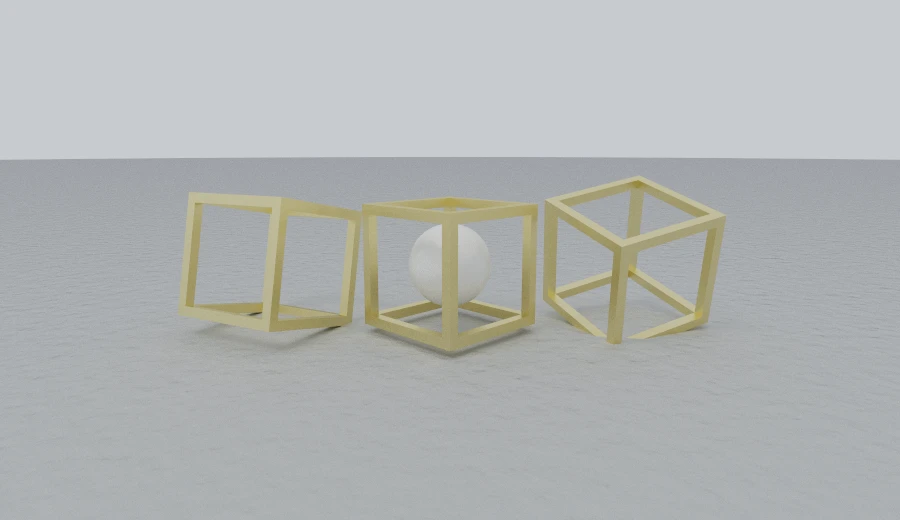
Here are three frames, one containing a marble sphere. The library's transforms, materials and floor work with the custom shape in the usual way.
args supplies the values after the query point. Numbers become float constants, pairs become vec2, and triples become vec3. The middle frame compiles to:
float map(vec3 p) {
  vec3 q0 = p - vec3(1.2, 0.0, 0.0);
  float d1 = sdBoxFrame(q0, vec3(0.6, 0.6, 0.6), 0.055);
  return d1;
}
The function source appears above the generated code, with a comment explaining its scope:
// GLSL the scene brought with it — distance functions, patterns, height
// fields, environments — emitted exactly as given, one copy per name however
// many places call it. Nothing the compiler writes is declared yet, so these
// see the language's own functions and each other, and nothing else.
float sdBoxFrame(vec3 p, vec3 b, float e) {
Each function name is emitted once. Reusing a name with different source causes a compile-time error. Your function can call GLSL built-ins and your own helpers, but not the library's generated functions, which are declared later.
Validation and distance bounds
The library checks names, return types and arguments when you build the scene. Names must be valid, non-reserved GLSL identifiers and must not collide with generated names such as map or sceneMaterial.
Your code must define the named function, returning float for shapes, patterns and bumps, or vec3 for backgrounds. Arguments must be finite.
The source also rejects backslashes, backticks, ${, </script and <!--, which could interfere with embedding the compiled scene in a page.
It cannot prove that your function returns a safe distance. Values should be negative inside, positive outside and never overestimate the distance to the nearest surface. An overestimate can make a ray step through the shape.
Here is an octahedron field that overestimates the distance:
const OCTA_BOUND = `float sdOctaBound(vec3 p, float s) {
  p = abs(p);
  return p.x + p.y + p.z - s;
}`

custom({ name: 'sdOctaBound', code: OCTA_BOUND, args: [0.95] })
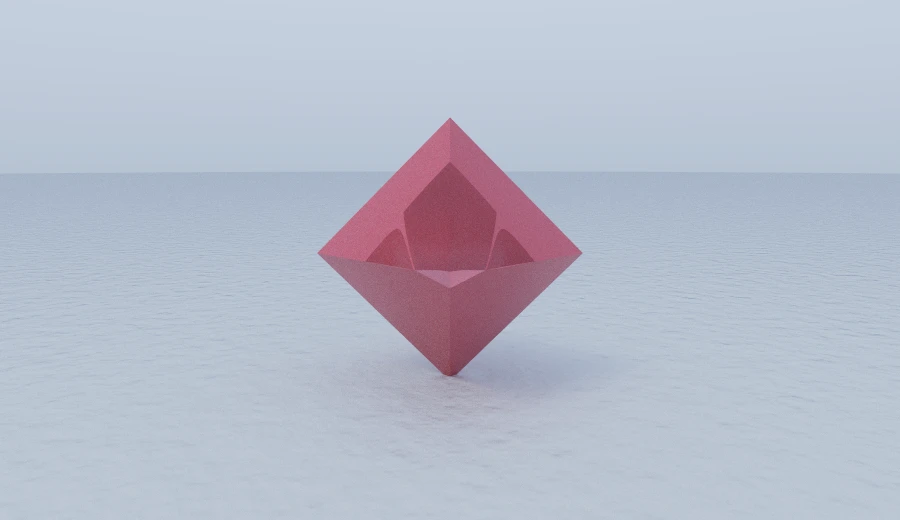
The sum of absolute coordinates changes too quickly to use directly as a step size. Rays can land inside the octahedron and shade the wrong point, producing facets that don't belong on the surface.
lipschitz supplies a correction factor. The compiler divides the field by it to produce safer, smaller steps. For this sum of three absolute coordinates, use √3:
custom({
  name: 'sdOctaBound',
  code: OCTA_BOUND,
  args: [0.95],
  lipschitz: Math.sqrt(3),
})
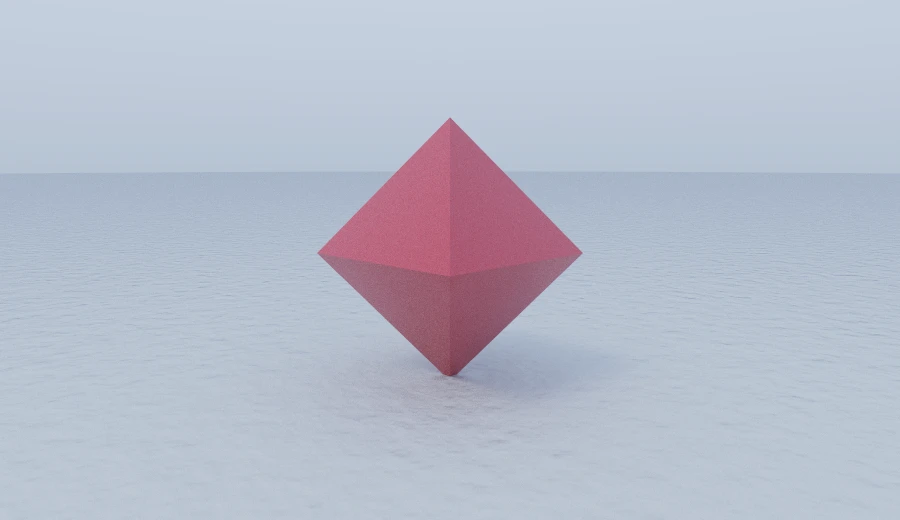
float map(vec3 p) {
  float d0 = sdOctaBound(p, 0.95) / 1.7320508075688772;
  return d0;
}
lipschitz must be at least 1. Values above 1 also add a step limit, so a ray cannot keep taking tiny steps towards a surface indefinitely.
Checking a field
checkField samples the compiled field on a grid. At each point it tries the proposed step in several directions. If a step crosses the surface, the field has overestimated the safe distance.
The result estimates a correction factor from those failures. It helps check a field, though sampling cannot prove it is safe everywhere.
Run on the box frame, which is an exact distance:
checkField(boxFrame([0.6, 0.6, 0.6], 0.055))
// { lipschitz: 1, ok: true, at: [0, 0, 0], surface: true, samples: 110592 }
and on the octahedron above, which is not:
checkField(custom({ name: 'sdOctaBound', code: OCTA_BOUND, args: [0.95] }))
// { lipschitz: 1.7297298908233643, ok: false,
//   at: [0.9787232875823975, 0.9787232875823975, -1.0638298988342285],
//   surface: true, samples: 110592 }
Here it estimates 1.7297, close to √3 (1.7320). The grid missed the exact worst case. ok: false identifies an overestimate, with at giving its location. ok: true means only that the samples found no problem.
Try a higher resolution if the shape still has holes. The default 48 checks 110,592 points, and doubling the resolution multiplies the work by eight.
surface reports whether the sampled region contains an inside. This can catch unsigned fields, such as length(p) with the radius subtraction missing.
The check needs WebGL2 because it runs the compiled GLSL. It is a development tool and is not called during rendering. You can check a whole subtree, for example checkField(twist(myShape, Math.PI / 2)).
A pattern of your own
patterns.custom takes a function returning a value from 0 to 1. It receives a point in the primitive's local coordinates, so the pattern moves with the shape.
const RINGS = `float ringField(vec3 p, float period, float width) {
  float r = length(p.xz);
  return smoothstep(width, 0.0, abs(fract(r / period) - 0.5) - 0.25);
}`

paint(vase, {
  ...materials.ceramic([0.88, 0.86, 0.8]),
  pattern: patterns.custom([0.06, 0.2, 0.26], {
    name: 'ringField',
    code: RINGS,
    args: [0.17, 0.11],
    roughness: 0.35,
  }),
})
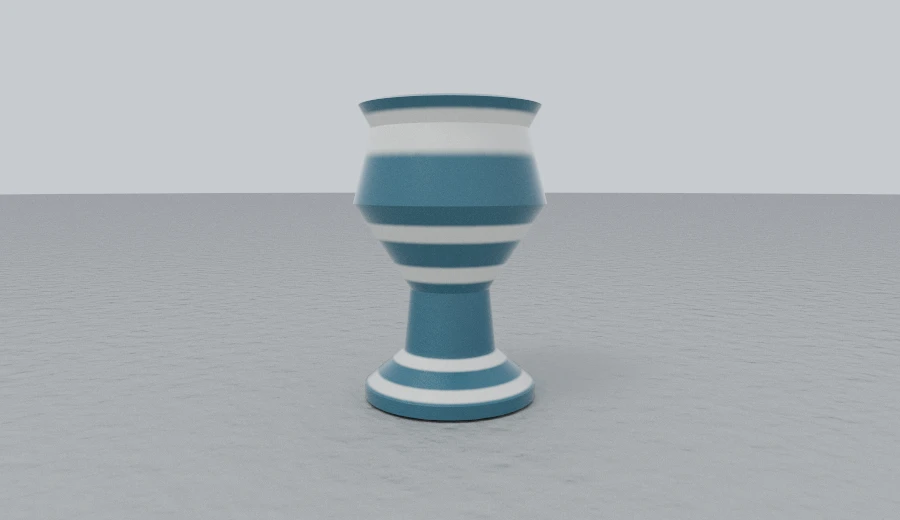
The rings form bands around the pot. The pot itself uses revolve, covered in the companion post.
Here is the code the compiler adds to blend the pattern into the material:
// The scene's procedural patterns, each evaluated at the point a ray hit
// in the frame of the primitive it hit.
float pattern0(vec3 p) {
  return ringField(p, 0.17, 0.11);
}

void sceneMaterial(vec3 p, out vec3 albedo, out float rough, out float metal) {
  float pat = pattern0(p); albedo = mix(vec3(0.92, 0.91, 0.88), vec3(0.1, 0.2, 0.3), pat); rough = 1.0; metal = 0.0;
}
The return value is not clamped, so values outside 0–1 extrapolate past the two materials. With projection: 'triplanar', your function also receives the surface normal: float name(vec3 p, vec3 n, …).
A height field of your own
bumps.custom takes a height function. The library uses it to change the shading normal without moving the surface:
const WEAVE = `float weaveField(vec3 p, float sharpness) {
  return pow(abs(sin(p.x) * sin(p.z)), sharpness);
}`

paint(sphere(0.8), {
  ...materials.fabric([0.42, 0.16, 0.14]),
  bump: bumps.custom(0.4, {
    name: 'weaveField',
    code: WEAVE,
    args: [0.6],
    scale: 26,
  }),
})
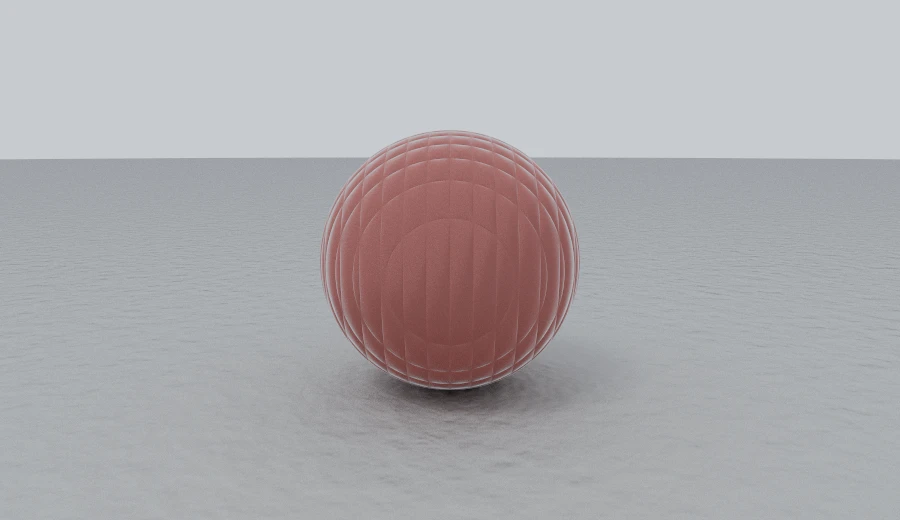
The sphere's outline is unchanged; the weave comes entirely from shading. The compiler adds this around the height function:
float bump0Field(vec3 p) {
  vec3 q = p * vec3(24.0, 24.0, 24.0);
  return weaveField(q, 0.6);
}

// The field's slope, as the normal it turns: three differences around the point,
// with the part along the normal taken out — that part would lift the whole
// surface rather than tilt it, and the surface is not going anywhere.
vec3 bump0(vec3 p, vec3 n) { … }
The input point is already multiplied by scale, so you can adjust the feature size in the scene settings.
slope describes how much the field rises over one feature, and defaults to 1. The library divides by it to keep strength comparable with built-in bumps. For a field rising from 0 to 10, use slope: 10.
An environment of your own
customBackground takes a ray direction and returns the light arriving from that direction. The renderer calls it when a ray leaves the scene:
const SLATS = `vec3 slatSky(vec3 rayDir, float period, vec3 warm, vec3 cool) {
  return mix(cool, warm, pow(0.5 + 0.5 * sin(rayDir.y * period), 2.0));
}`

customBackground({
  name: 'slatSky',
  code: SLATS,
  args: [34, [1.35, 1.15, 0.85], [0.04, 0.05, 0.09]],
  sun: sun([-0.5, 0.66, -0.4], [5.5, 5.1, 4.6], 120),
})
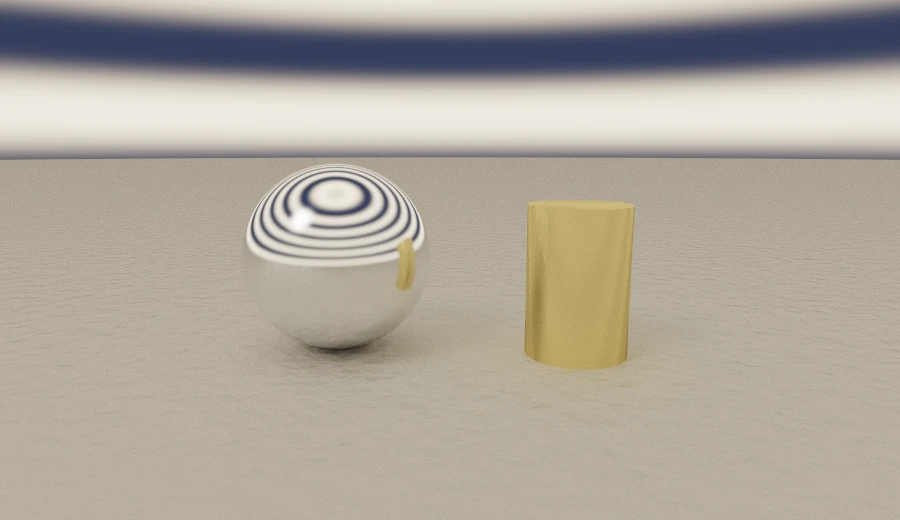
The example makes 34 horizontal bands of light. These appear in the chrome sphere's reflections and illuminate the other objects. Their edges also make the brass cylinder's grain easier to see.
The return value represents light, so components can exceed 1. The warm band uses [1.35, 1.15, 0.85]. Keep the function inexpensive: it can be sampled as paths bounce through the scene.
You can add a sun as with the built-in backgrounds. The library combines it with the light from your function.
All four at once
A hand-written shape, a hand-written pattern, a hand-written height field on the floor, and a hand-written sky:
draft(
  plane([0, 1, 0], -1)
    .paint({
      ...materials.plaster,
      bump: bumps.custom(0.22, {
        name: 'weaveField',
        code: WEAVE,
        args: [0.75],
        scale: 14,
      }),
    })
    .union(
      boxFrame([0.55, 0.55, 0.55], 0.045)
        .rotate([0.3, 0.6, 0.1])
        .translate([-1.5, -0.35, 0.1])
        .paint(materials.brass),
      VASE.scale(0.8)
        .translate([0.55, -0.15, -0.1])
        .paint({
          ...materials.ceramic([0.9, 0.88, 0.84]),
          pattern: patterns.custom([0.05, 0.18, 0.24], {
            name: 'ringField',
            code: RINGS,
            args: [0.13, 0.1],
            roughness: 0.3,
          }),
        }),
      sphere(0.34).translate([-0.35, -0.66, -0.9]).paint(materials.glass),
    ),
  SLAT_SKY,
).withCamera(
  camera([0, 0.55, -5.4], [0, -0.25, 0]).lens(43, 4).worldUnit(100).focus(5.4),
)
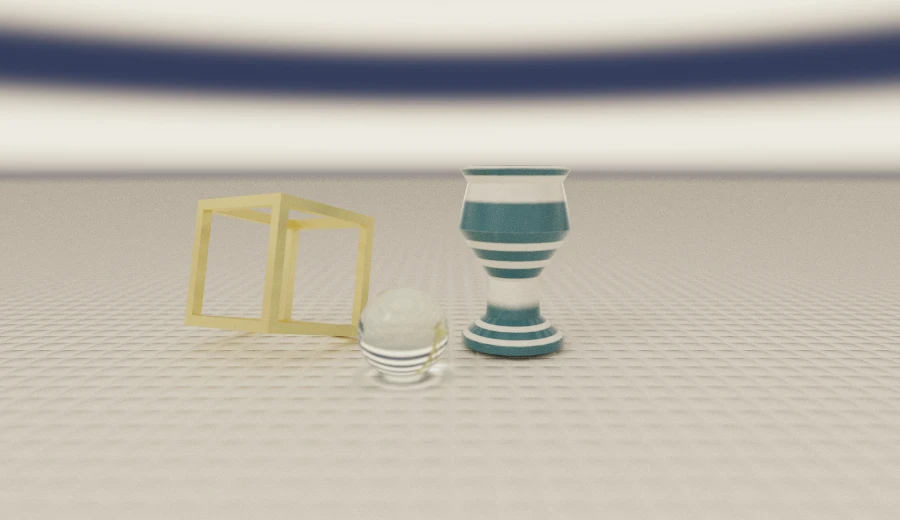
Four short GLSL functions give us a custom shape, pattern, bump and sky. They also work with the built-in glass and depth of field.
A larger example
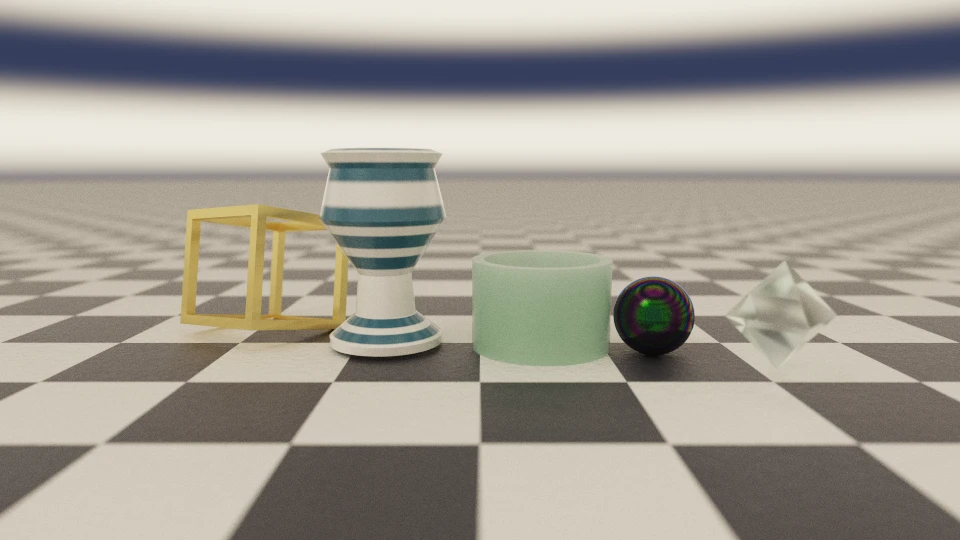
A hand-written box frame in brushed brass, the ringed vase, a jade cup, an oil slick, a glass octahedron on a corrected bound, a chequerboard on the floor, and the slat rig overhead:
Installing
pnpm add scenic-draft       # the library, still dependency-free
pnpm add scenic-draft-react # the component, and both dialects with it
Custom functions use the same scene structure as the built-in features. You can start with the standard builders, then replace just the shape or effect that needs more control.
Documentation lives at scenic-draft.pages.dev.