Scenic Draft 0.5: Domain Repetition, New Primitives and Non-Square Canvases
I recently introduced scenic-draft, my TypeScript library for rendering 3D scenes in the browser. Here are the additions up to version 0.5.0.
A summary of recent updates:
repeat(0.2.0) repeats a shape finitely or infinitely through space.widthandheight(0.3.0) support non-square canvases.cone,ellipsoid,octahedronandhexPrism(0.4.0) add four primitives.
The images below were rendered with the library in a headless browser and saved as files.
Four new primitives
The original primitives were sphere, box, torus, cylinder, capsule and plane. These four additions are also centred at the origin, use half-dimensions where applicable, and validate their arguments.
| Builder | Shape |
|---|---|
cone(radius, halfHeight) | A cone along y: a flat cap of radius at y = -halfHeight, tapering to a point at y = +halfHeight. |
ellipsoid([rx, ry, rz]) | A sphere with a semi-axis length per axis. The shape you cannot get from scale, which is uniform. |
octahedron(radius) | A regular octahedron, where radius is the distance from the centre to a tip (so the solid is abs(x) + abs(y) + abs(z) <= radius). |
hexPrism(radius, halfHeight) | A hexagonal prism along y. radius is the apothem: centre to the middle of a flat, not to a corner, which sits further out at 1.1547 x radius. |
From 0.21.0, import hexPrism from scenic-draft-extras. The calls below are otherwise unchanged.
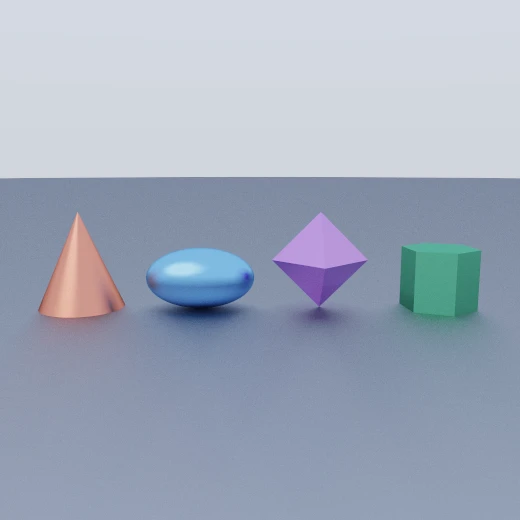
Here they are on a floor at y = -1. An ellipsoid with ry: 0.5 needs its centre at y = -0.5 to rest on it. The octahedron balances on its lower tip:
union(
  paint(plane([0, 1, 0], -1), { color: [0.5, 0.5, 0.53], roughness: 0.9 }),
  paint(translate(cone(0.7, 0.8), [-3, -0.2, 0]), { color: [0.85, 0.3, 0.2] }),
  paint(translate(ellipsoid([0.9, 0.5, 0.6]), [-1, -0.5, 0]), {
    color: [0.25, 0.5, 0.85],
  }),
  paint(translate(octahedron(0.8), [1, -0.2, 0]), { color: [0.6, 0.3, 0.75] }),
  paint(translate(rotateY(hexPrism(0.55, 0.5), 0.4), [3, -0.5, 0]), {
    color: [0.2, 0.6, 0.35],
  }),
)
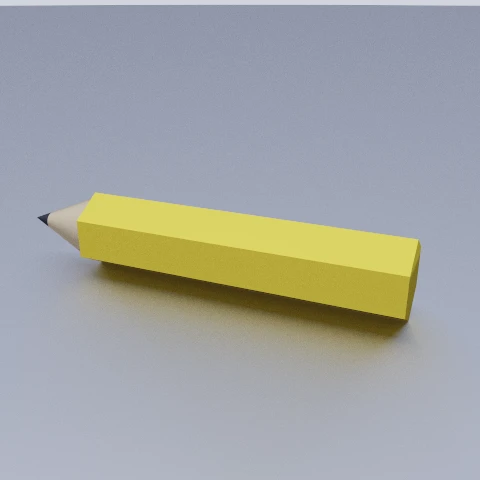
Let's make a pencil. The body is a hexagonal prism, and the sharpened end uses two cones. We clip the wooden cone with a plane, then add a smaller graphite cone.
Both cones use a radius-to-length ratio of 0.25 / 0.6, so their slopes line up:
union(
  paint(hexPrism(0.25, 1.2), { color: [0.95, 0.72, 0.1] }), // barrel
  paint(
    intersect(translate(cone(0.25, 0.3), [0, 1.5, 0]), plane([0, 1, 0], 1.64)),
    { color: [0.85, 0.68, 0.45], roughness: 0.7 }, // wood, cut off at y = 1.64
  ),
  paint(translate(cone(0.0667, 0.08), [0, 1.72, 0]), {
    color: [0.09, 0.09, 0.1], // graphite, continuing the same taper
  }),
)
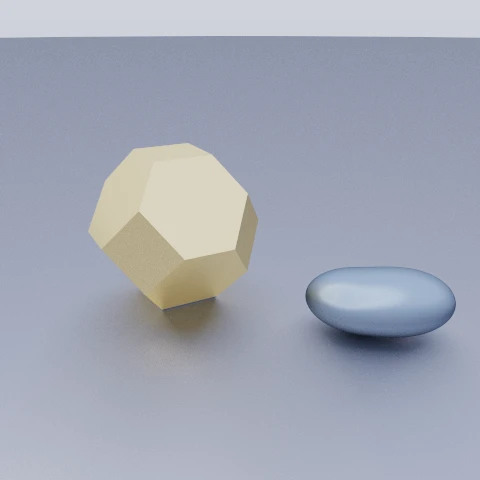
The usual operators work on these shapes. Here we clip an octahedron with a box to remove its tips, then use grow to soften the edges. Beside it, smoothUnion combines two ellipsoids into a pebble:
grow(intersect(octahedron(1.3), box([0.85, 0.85, 0.85])), 0.04)
cone and hexPrism return exact distances. ellipsoid and octahedron use lower bounds, which let the tracer take safe but sometimes smaller steps.
An elongated ellipsoid may therefore need more steps than a sphere. Boolean operations and blends still work in the same way.
Domain repetition
The biggest new feature is repeat(node, spacing, counts?), which tiles a subtree through space:
repeat(sphere(0.45), [1.6, 0, 1.6])
spacing is the cell size per axis, and a component of 0 leaves that axis untiled, which is how you choose the directions of repetition. [1.6, 0, 1.6] fills the x–z plane and leaves y alone; [3, 0, 0] is a row along x.
The shader maps each sample point into one cell before evaluating the shape. It doesn't create a separate sphere for every copy. Here is the generated code:
float map(vec3 p) {
  vec3 q0 = vec3(p.x - 1.6 * round(p.x / 1.6), p.y, p.z - 1.6 * round(p.z / 1.6));
  float d1 = length(q0) - 0.45;
  return d1;
}
An infinite grid therefore adds only a small coordinate calculation per step to the sphere's distance function:
union(
  paint(plane([0, 1, 0], -1), { color: [0.55, 0.55, 0.58], roughness: 0.85 }),
  paint(translate(repeat(sphere(0.45), [1.6, 0, 1.6]), [0, -0.55, 0]), {
    color: [0.85, 0.28, 0.22],
  }),
)
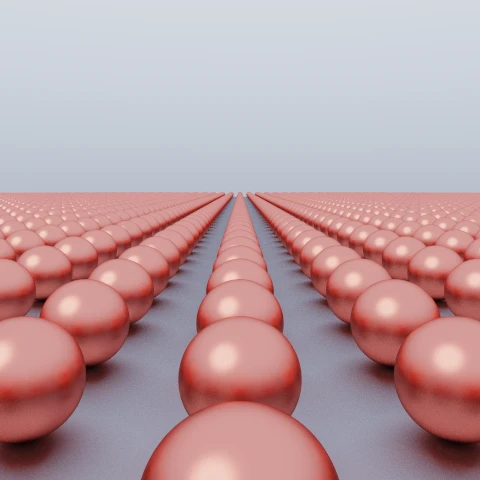
translate outside repeat moves the whole grid, placing it on the floor. Inside repeat, it moves the shape within each cell.
An infinite grid on all three axes can block every path to the background light. Leaving y unrepeated keeps a view of the sky.
Counting cells
Repetition is infinite by default. counts limits the copies on either side of the centre: n gives 2n + 1 copies. null leaves that axis unlimited. Here [3, 3, 3] repeats one sphere into a block:
repeat(sphere(0.3), [0.95, 0.95, 0.95], [3, 3, 3]) // 7 x 7 x 7 = 343 spheres
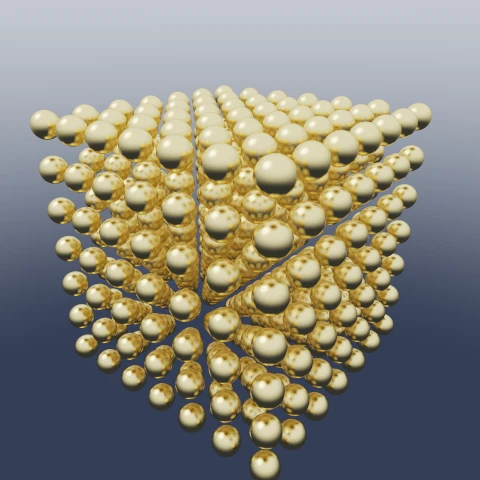
The bounded version adds a clamp to the cell index:
vec3 q0 = vec3(p.x - 1.6 * clamp(round(p.x / 1.6), -3.0, 3.0), p.y, p.z - 1.6 * clamp(round(p.z / 1.6), -2.0, 2.0));
You can mix limits: [2, null, 0] gives five cells on x, unlimited cells on y and one on z, provided those axes have non-zero spacing.
Repeats are just nodes
A repeated shape can also be used in a boolean operation. Here, subtracting a repeated cylinder makes thirty-five holes:
The cut surface takes the cutter's material. Painting the cylinders orange leaves orange bores in the white slab:
subtract(
  paint(box([2.2, 0.25, 1.4], 0.06), { color: [0.9, 0.9, 0.92] }),
  paint(repeat(cylinder(0.16, 1), [0.55, 0, 0.55], [3, null, 2]), {
    color: [0.95, 0.35, 0.1],
  }),
)
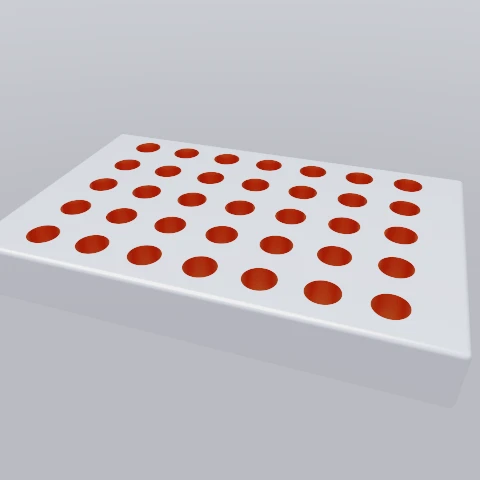
The y spacing of 0 matters here: the cylinders must not repeat vertically or they would tile through the slab.
The shape must fit inside its cell on each repeated axis. If it crosses a cell boundary, the folded distance can be inaccurate and the surface may break up. Smooth blends also cannot join copies across that boundary.
Non-square canvases
Every scene in the original post was square, because render only took a single size. 0.3.0 adds width and height:
render(canvas, spec, { width: 960, height: 540 })
size still works and is now shorthand for equal width and height. An explicit dimension takes precedence over it, and anything unspecified falls back to 1024.
The camera scales coordinates by the shorter image dimension. Making a square canvas wider reveals more at the sides without stretching the scene. For example, moving from 512 × 512 to 960 × 540 gives a wider view.
That suits a colonnade: hexagonal columns repeat along z, with a finite count on x, a gem at the end and a low sun:
const column = translate(repeat(hexPrism(0.32, 1.5), [0, 0, 2.6]), [0, 0.5, 0])

{
  background: gradient([0.45, 0.26, 0.15], [0.08, 0.13, 0.36], {
    horizon: 0,
    width: 0.5,
    sun: sun([-0.5, 0.2, 0.45], [11, 6, 2.6], 70),
  }),
  camera: { position: [0, 0.6, -9], target: [0, 0.45, 0], focalLength: 40 },
  scene: union(
    paint(plane([0, 1, 0], -1), { color: [0.5, 0.48, 0.46], roughness: 0.6 }),
    paint(translate(column, [-2.4, 0, 0]), { color: [0.72, 0.68, 0.62] }),
    paint(translate(column, [2.4, 0, 0]), { color: [0.72, 0.68, 0.62] }),
    paint(translate(gem, [0, -0.1, 0]), {
      color: [0.95, 0.78, 0.42],
      roughness: 0.1,
      metallic: 1,
    }),
  ),
}
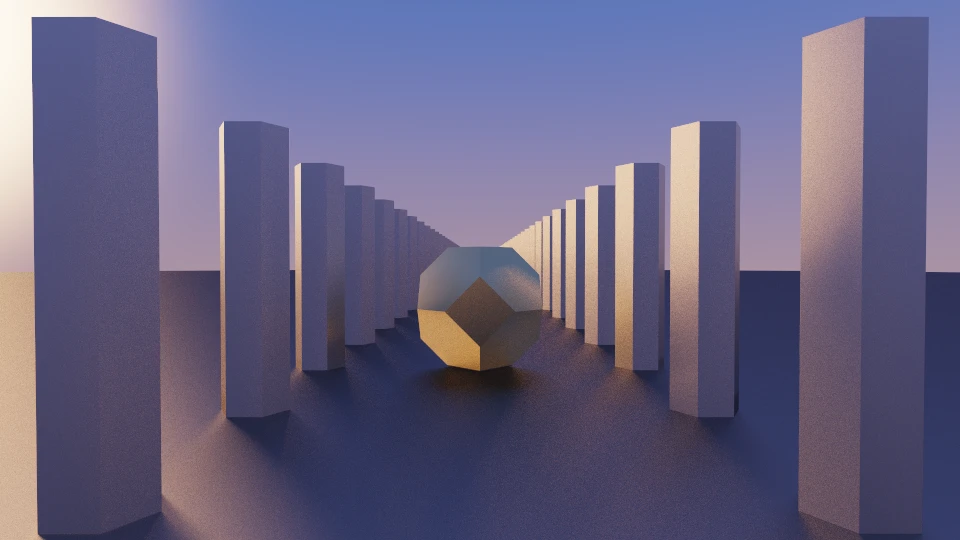
Rendering work scales with pixel count. A 960 × 540 image has about as many pixels as a 720 × 720 square, so it takes similar work to render.
Installing
pnpm add scenic-draft@0.5.0
These additions took about 130 lines of JavaScript. I particularly like repeat: it makes large patterns easy to describe and adds very little work per tracing step. Distance fields make this kind of operation surprisingly simple.